Support
Everything you need to get started and get help.
Everything you need to get started and get help.
Quick Start
Follow these steps to set up your PixTree E Ink Canvas.
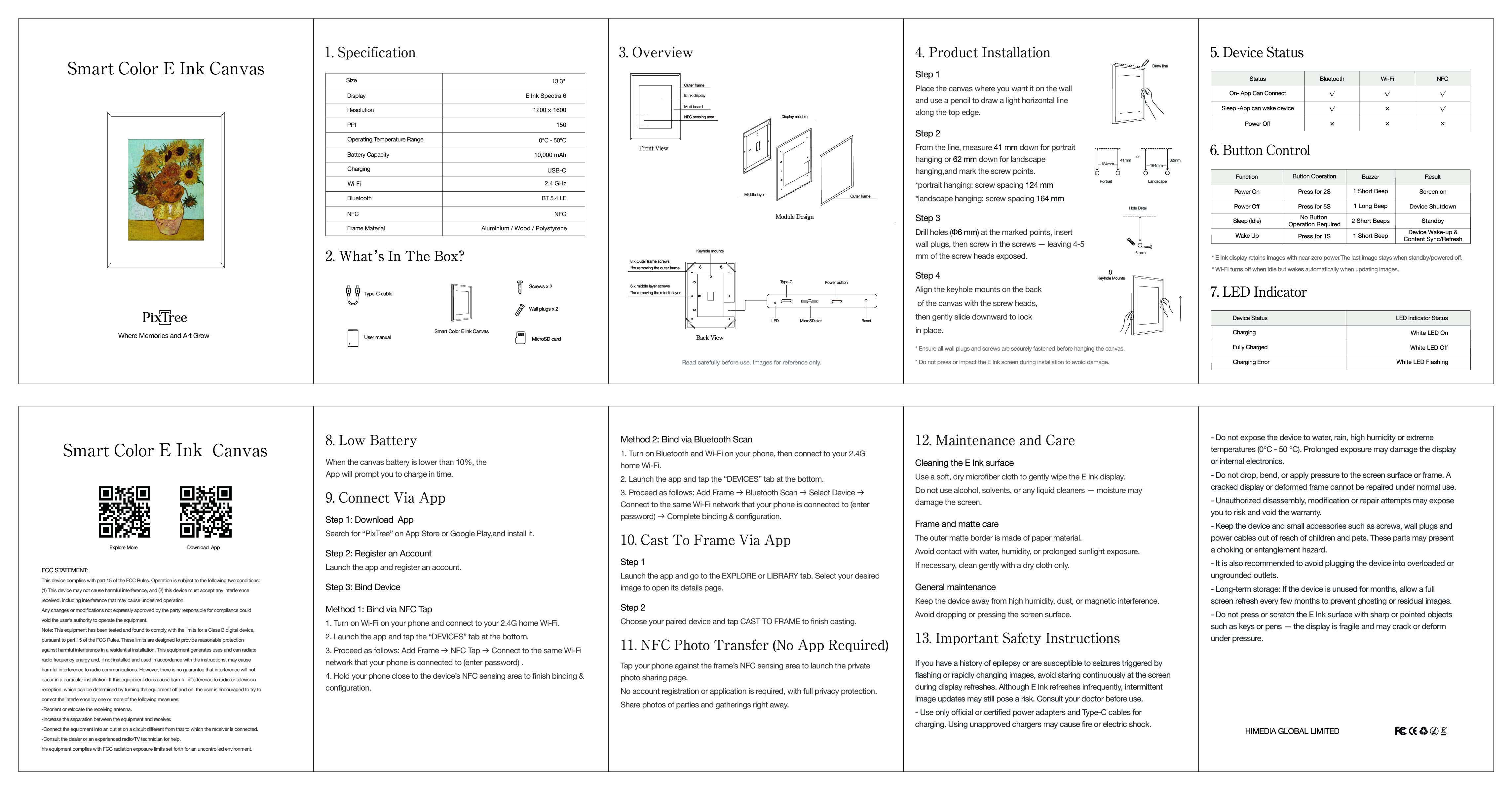
Press and hold the Power Button on the back of the frame for 2 seconds. When the screen refreshes, the frame is powered on successfully.
Download the PixTree App from the App Store (iOS) or Google Play (Android).
Grant the PixTree App access to Bluetooth, Local Network, and Wireless Data.
Register a PixTree account using an email or a third-party account (Apple, Google).
Step 1: Turn on Bluetooth and Wi-Fi on your phone, then connect to your 2.4G Wi-Fi.
Step 2: Launch the PixTree App and tap the "DEVICES" tab at the bottom.
Step 3: Proceed as follows: ADD FRAME → BLUETOOTH SETUP → Select one of the DISCOVERED DEVICES → Connect to the same 2.4G Wi-Fi network that your phone is connected to (enter password) → Device Settings (set frame orientation, device name and time zone) → Storage Check (check microSD card status) → Complete binding and start your journey of memories & art.
Step 1: Turn on NFC and Wi-Fi on your phone, then connect to your 2.4G Wi-Fi.
Step 2: Launch the PixTree App and tap the "DEVICES" tab at the bottom.
Step 3: Proceed as follows: ADD FRAME → NFC SETUP → Connect to the same 2.4G Wi-Fi network that your phone is connected to (enter password) → Ready to Scan (hold your phone close to the device's NFC sensing area) → Device Settings (set frame orientation, device name and time zone) → Storage Check (check microSD card status) → Complete binding and start your journey of memories & art.
Tap your phone against the PixTree frame to instantly share photos. No app required, no sign-up needed. Privacy-first photo sharing.
FAQ
E Ink reflects ambient light like paper instead of emitting light like LCD or OLED screens. This reduces glare and eye strain, uses very little power, and keeps the last image visible even when the device is powered off.
With typical use of one refresh per day, the battery can last 1- 3 years. Power is mainly consumed when the image changes, not while the image is being displayed.
Images are encrypted and stored securly on Google Cloud using industry-standard security practices and regular audits.
The device ships with a 16GB SD card installed.
PixTree Canvas uses E Ink Spectra 6, the most advanced color e-paper display technology. Since it does not emit light, it delivers a paper-like viewing experience and ultra-low power consumption. At the same time, this means the display relies heavily on ambient lighting to look its best. We recommend placing the canvas near a window or under good indoor lighting.
As a new generation of color e-paper, the final color appearance is also influenced by software and algorithms. We’re continuously working on color-related software updates and display algorithms to improve overall performance and reduce the “dark” look in some images. These improvements will be delivered via OTA updates.
That said, even with the latest E Ink Spectra 6 technology, it’s important to be upfront: it still cannot fully match the color brightness and saturation of printed photos or LCD displays. This is a breakthrough display technology, but it will continue to evolve over time.
The app is available on Google Play and the App Store in most regions. If it is unavailable in a region, contact stone.long@himedia.cn. On some Android devices, Google Play compatibility may block installation; users can request an APK from support while compatibility fixes are being worked on.
PixTree E Ink Canvas products use E-Ink Spectra 6 color display technology.
E-Ink reflects ambient light instead of producing its own light. It is designed to be glare-free, easier on the eyes, power-efficient, and able to retain the displayed image even without power.
The panel is a 6-color E Ink Spectra 6 display. PixTree uses dithering algorithm to create a full-color viewing effect. More information: https://www.eink.com/brand/detail/Spectra6
The display has a matte, paper-like appearance, but it is still an E-Ink panel rather than printed paper. From a normal viewing distance, the difference is subtle.
Spectra 6 colors are softer than traditional prints, but it is one of the best-performing color e-paper displays currently.
13.3 inches: 1600 x 1200, 150.4 PPI
A full Spectra 6 refresh takes about 20 seconds.
This is part of how color E-Ink (Spectra 6) works:
The panel has no backlight and relies entirely on ambient light, so in dim rooms it will naturally look darker than paper.
The color layer slightly lowers the “paper white,” so the background will look a bit grey compared to real white paper.
We recommend:
Placing the canvas in a bright spot (near a window or in a well-lit area).
Editing your images with higher brightness and saturation, and avoiding very dark or extremely detailed photos that don’t translate well to E-Ink.
One-year warranty for manufacturing defects. Software issues may be addressed through OTA updates.
Email: stone.long@himedia.cn
The mobile app requires internet access and connects to PixTree’s Google cloud server. The desktop app can work offline as long as the device is on the local network.
Bluetooth is used only for activation and wake-up. Image transfer uses Wi-Fi for speed and stability.
Wi-Fi is needed when transferring a new image. When the device is idle and showing an existing image, it enters sleep mode and turns Wi-Fi off to save power.
Supported formats include JPEG, JPG, PNG, GIF, WEBP, and HEIC. Users do not need to manually convert images to a 6-color format because PixTree’s apps handle conversion.
No. The Canvas supports static images only because E-Ink refresh behavior is not suitable for GIF animation or video playback.
No.
Yes, but we recommends using the desktop app for local control because it handles resizing and format conversion automatically.
The E-Ink screen uses no power to keep a static image visible. The communication module sleeps at low power when idle. With typical use of one image refresh per day, battery life is roughly 1-3 years.
The device charges through a USB-C port on the back.
When the canvas battery is lower than 10%, the PixTree App will prompt you to charge in time. The last displayed image remains visible after the battery is depleted.
The devices use a rechargeable lithium battery charged through USB-C.
Battery aging depends on charge cycles. Since the device only needs occasional charging, it can be used for many years.
Wi-Fi is turned off during idle sleep mode and consumes power only while the device is awake and connected.
Yes. The default frame is black aluminum. You can also choose different frame styles on our official website, customize your own frame, or use compatible IKEA RÖDALM frames.
Yes. The default mat board is white, and it can be replaced with a black mat board at a local framing shop.
No results found
Try a different search term